
Pregnancy App & Baby Tracker
BabyCenterParenting
4.993.85K Reviews
- Version
- 6.17.0
- Installs
- 10.00M
- Age Rating
- Teen
Screenshots

Our Review of Pregnancy App & Baby Tracker
 Analysis by Appyee
When I first opened Pregnancy App & Baby Tracker, I wanted something that could make a new stage feel a little easier to follow, rather than another complicated task to manage. It is a free parenting app from BabyCenter, built around pregnancy information and week-by-week development. For a first-time parent, that focus gives the experience a clear starting point: set your timeline, look at what is relevant now, and return when you have a question.
Features That Stand Out
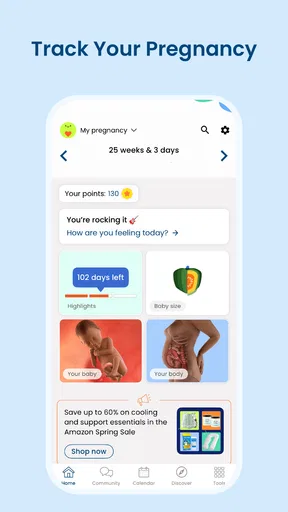
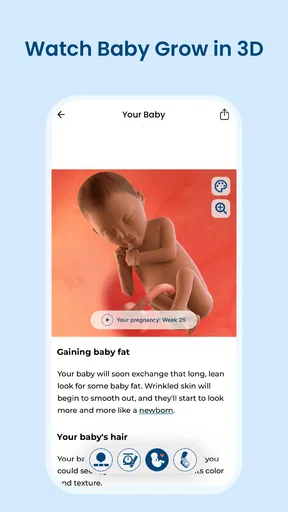
First off, the app is loaded with features that are both practical and informative. You can track your baby’s development week by week, and let me tell you, it’s fascinating to know what’s happening inside there! The daily tips and articles are great too, offering insights that range from nutrition advice to what to pack for the hospital. It’s like having an encyclopedia at your fingertips.
That steady, time-based approach is more useful than a large library you have to search without direction. I’d treat the week’s material as a prompt for questions, not as a checklist of things you must feel or accomplish. Pregnancy varies from person to person, and an article can help you prepare for a conversation without deciding what is medically right for you.
Intuitive User Interface
The user interface is incredibly intuitive. I didn’t have to spend ages figuring out where everything was. The layout is clean, and the navigation is smooth, which is a huge relief when you’re juggling a million other things. Plus, the colors and graphics are super calming, which is exactly what you need when the pregnancy hormones are running wild!
For a first visit, I’d keep the setup simple: enter your due date so the timeline can make sense, then browse the current week instead of trying to read everything at once. If the date is uncertain or later changes, updating it is the practical way to keep the guidance aligned with your pregnancy. You do not need to turn the app into a full journal to get value from its core rhythm.
A useful everyday routine is to check in when a question naturally comes up—perhaps while making a shopping list, planning meals, or preparing for an appointment. Save the topic you want to ask about in your own notes, then bring it to your clinician. This turns general reading into something actionable and helps keep online advice from replacing care tailored to your circumstances.
Community and Support
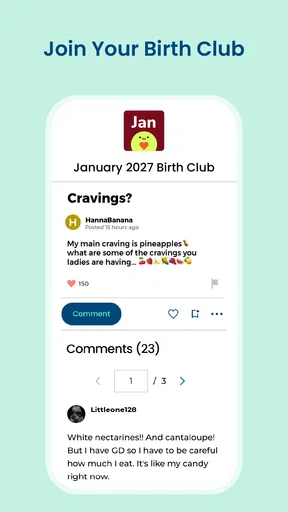
One of the features I found really helpful was the community support. You can connect with other parents-to-be, share experiences, and even get advice from those who are a bit further along in their journey. It’s like having a support group right in your pocket.
The community can be especially reassuring when you want to hear how other people handle the ordinary uncertainty of pregnancy. I’d use it for companionship and perspective, while keeping a firm boundary around medical decisions. Someone else’s experience can be comforting, but it cannot tell you whether a symptom is harmless in your own case. When something worries you, a qualified professional is the better person to ask.
Compared with relying only on search results, a pregnancy-focused community can feel more connected to the stage you are in. The trade-off is that personal stories are uneven: one person’s reassuring experience may not apply to you, and reading too many can create more worry than clarity. I’d dip in when conversation sounds helpful, then step away if it becomes a source of comparison or anxiety.
Customization and Personalization
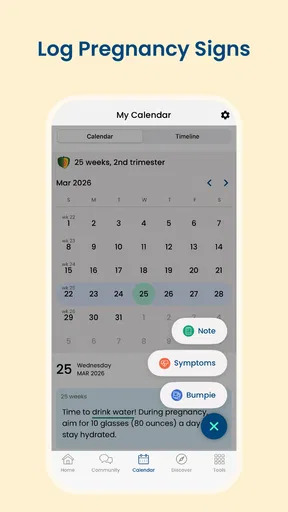
Customization is another big win for this app. You can personalize your experience by inputting your due date, which then tailors the information to your specific timeline. It’s like having a pregnancy planner that’s all about you and your baby.
That makes the app a natural fit for someone who likes a gentle weekly guide but does not want to build a detailed tracking system from scratch. It can also give a partner or family member a simple way to follow along with the same broad timeline, although I would not assume that everyone will want the same amount of information. Sharing an article or a question can be more comfortable than expecting someone else to monitor every update.
There is a practical limitation to this kind of personalization: a due date organizes content, but it does not make every milestone a prediction of exactly what will happen. If you prefer a neutral calendar with no pregnancy-specific material, or already get all your guidance through a clinician’s portal, a general calendar or that existing resource may suit you better. BabyCenter is most appealing when you want pregnancy information gathered around your stage.
The app is free, and its broad reach is reflected in an average rating of 4.9 from around 1.5 million ratings, with over 10 million installs. Those numbers suggest many people find it useful, but they are not a guarantee that its tone or content will suit every expectant parent. It is rated Teen, so I would still make my own judgment about whether its articles and community are appropriate for a younger user.
BabyCenter has developed the app over time; it was released on March 11, 2011, and the current version is 5.42.0. It requires iOS or Android 8.0 or later. If you are deciding whether to install it, checking that your device meets that requirement is a simple first step. After that, the most meaningful test is whether the week-by-week view answers a question you actually have.
One realistic use case is a quiet check-in before an appointment. I might open the app, read the current week’s material, and write down one concern about a change I have noticed and one practical question about what to prepare next. That is a better use of the content than scrolling through every article or comparing my experience with other people’s. It keeps the app in a supporting role and gives the appointment a clearer starting point.
Tools for the Moments That Matter
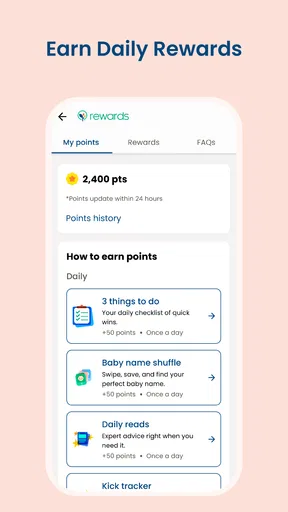
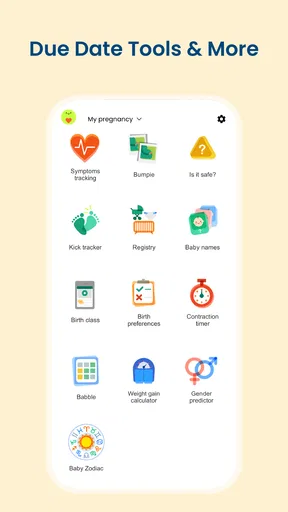
Oh, and I can’t forget to mention the kick counter and contraction timer. These tools are absolute lifesavers when you’re trying to keep track of those little movements and the inevitable countdown to labor.
I would think of these as handy tools to have available, rather than a reason to delay getting advice. If you have concerns about movement, contractions, or anything else, follow the instructions from your healthcare professional. A timer can help you record what is happening, but it cannot assess your health or tell you when a situation is safe. That distinction matters most when you are tired, uncomfortable, or trying to decide what to do quickly.
For less urgent preparation, the tools may help you be more specific when describing a pattern. If you use them, focus on recording what you need for a conversation rather than repeatedly checking for reassurance. Not every pregnancy will call for the same tracking routine, and a feature that is useful in one moment may be unnecessary in another.
More broadly, BabyCenter sits between a basic date tracker and a medical-care app. A simple calendar may be enough if all you want is a reminder of your timeline. A clinician’s service is the better choice for personal advice and care. This app’s strength is bringing pregnancy-focused reading, community, and a few practical tools together, so you can choose among them without treating any one feature as a substitute for professional support.
Final Thoughts
In conclusion, the Pregnancy App & Baby Tracker has really impressed me with its comprehensive features and ease of use. It’s like having a personal assistant, doctor, and friend all rolled into one. Whether you’re looking to track your pregnancy milestones or connect with other parents, this app has you covered.
I’d soften one part of that comparison: it can feel like a friendly organizer and information companion, but it is not a doctor, and its community is not a replacement for professional guidance. Keeping that boundary clear lets you enjoy the approachable side of the app without relying on it for decisions it cannot make.
If you’re expecting and hunting for an app that can make your pregnancy journey a little smoother, I’d definitely recommend giving this one a go. Trust me, you won’t want to go through this without it!
My recommendation is strongest for first-time parents who want a low-pressure way to follow a pregnancy timeline, read relevant material, and feel less alone. It may be less suitable if community discussion makes you anxious, if you want clinical answers from an app, or if you prefer not to receive pregnancy-focused content. Start with the due date and the current week, use one article to shape a real question, and see whether that small routine helps. That is the clearest first success—and a fair way to decide if it belongs in your daily life.
Privacy and Permissions
See what permissions an app requests and how it handles your data.
- Phone
- read phone status and identity
- Photos/Media/Files
- read the contents of your USB storage, modify or delete the contents of your USB storage
- Storage
- read the contents of your USB storage, modify or delete the contents of your USB storage
- Wi-Fi connection information
- view Wi-Fi connections
- Device ID & call information
- read phone status and identity
- Other
- view network connections, full network access, run at startup, prevent device from sleeping
Verdict
Strengths of Pregnancy App & Baby Tracker
- Comprehensive weekly tips and advice.
- Easy-to-use interface for new parents.
- Customizable reminders for appointments.
- Community support for sharing experiences.
- Detailed growth tracking for baby.
Limitations of Pregnancy App & Baby Tracker
- Limited offline functionality.
- Some features require premium access.
- Occasional ads can be distracting.
- Data entry can be time-consuming.
- No multilingual support currently.
Similar Picks in This Category
View All
Family Space
Motorola Mobility LLC.3.9

شرطة الأطفال - مكالمة وهمية
Oub Apps4.1

Findmykids: Parental Control
LETEM LTD4.6

Pregnancy + | Tracker App
Philips Electronics UK Limited4.8

Policía de niños - para padres
Kids police4.7

Pregnancy App
Amila4.9
Frequently Asked Questions
What features does the Pregnancy App & Baby Tracker offer?
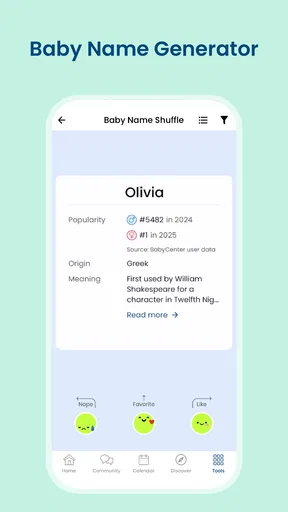
The Pregnancy App & Baby Tracker offers a range of features, including weekly updates on your baby's development, personalized pregnancy tips, and a comprehensive baby name database. It also provides a contraction timer, kick counter, and a due date calculator, all designed to support expectant parents throughout their pregnancy journey.
Is the Pregnancy App & Baby Tracker free to use?
The app offers a free version with essential features accessible to all users. However, there is also a premium version available through in-app purchases, which unlocks additional content such as advanced health insights, exclusive articles, and personalized advice from medical professionals.
How accurate is the information provided by the Pregnancy App & Baby Tracker?
The Pregnancy App & Baby Tracker offers data and tips curated by healthcare professionals, which enhances its reliability. However, it is important for users to consult directly with their healthcare provider for personalized medical advice, as the app's information is intended to be supplementary.
Can I use the Pregnancy App & Baby Tracker to track multiple pregnancies?
Yes, the app allows users to track multiple pregnancies simultaneously. This is particularly useful for parents expecting twins or those planning multiple pregnancies over time. Users can switch between profiles to monitor different pregnancy journeys and milestones without losing any data.
Is my personal information safe with the Pregnancy App & Baby Tracker?
The app prioritizes user privacy and security. It employs encryption and other security measures to protect personal data. Users can review the app's privacy policy for detailed information on data handling practices. It's always advisable to ensure the app is downloaded from official app stores to avoid security risks.
